Use this desk height calculator to plan ergonomic seated and standing desk height in cm or inches, plus chair height, keyboard height, monitor placement.
Last updated
Ergonomic desk height planner This desk height calculator turns body size, monitor setup, and work style into a seated
desk target, standing desk target, chair height, keyboard height, and a practical fit check
for a fixed-height desk.
Body measurements
Choose centimetres or feet and inches before entering measurements. Height is enough
for a solid baseline; seated elbow height gives a more precise ergonomic desk height
target when you have it.
Workspace setup
Choose whether you are planning a seated desk, a standing desk, or a sit-stand desk,
then adjust the inputs that move keyboard and monitor placement.
Current fixed desk height
Add the height of your current desk if you want to see whether it is too high or too
low for seated ergonomic desk work.
Desk height plan
72 cm (28.3 in) seated
Standing desk target: 107.5 cm (42.3 in), a lift of
35.5 cm (14 in) above the seated preset.
Use 72 cm for seated work and 107.5 cm for standing work so the keyboard stays near elbow height in both modes.
Optional fixed-desk checkAdd your current desk height if you want a fit check
The seated target tells you where the work surface should land, but a fixed-desk comparison shows whether you need a footrest, keyboard tray, risers, or a converter.
Chair seat
43.8 cm
Starting point for thighs supported, feet planted, and hips level or slightly above the knees.
Keyboard surface
70.5 cm
Typing usually feels better with the keyboard slightly below the main desk surface.
Monitor top
148.5 cm
Seated monitor top target. Monitor center lands near 133.6 cm.
Monitor distance
61 cm
Practical range: 53 to 69 cm.
Seated and standing presets
Store these as desk memory positions if your desk supports presets.
Seated desk
72 cm
Standing desk
107.5 cm
Standing monitor top
160.8 cm
Screen height used
29.9 cm
Precision and movement notes
This result uses population-average body ratios. Measuring seated elbow height from the floor to your elbow gives a more precise desk target.
Movement cadence: A practical sit-stand starting point is 30 to 45 minutes sitting, 15 to 20 minutes standing, plus 2 to 3 minutes of walking or shoulder rolls each hour.
Standing height in inches: 42.3 in
Seated height in inches: 28.3 in
If your desk is fixed
Use the fit check to decide whether the fix is a chair change, a footrest, a
keyboard tray, or a different desk.
Measure from the floor to the top of the work surface, not to the keyboard.
Compare that fixed height against the seated target first, because fixed desks usually fail there before they fail in standing mode.
Footrest likely: Not usually required Keyboard tray likely: Only if wrists still extend
Posture checklist
Use the numbers to set the workstation, then confirm the body cues below still look
right in real use.
Feet and knees
Keep feet flat with knees near 90 degrees. If the desk is high and the chair must rise, use a footrest rather than dangling the legs.
Shoulders and elbows
Shoulders should stay relaxed while elbows hover near 90 to 100 degrees with forearms close to the body.
Wrists and keyboard
Aim for straight wrists. The keyboard often needs to sit slightly below the desk surface for sustained typing comfort.
Monitor and neck
Set the top of the screen at or slightly below eye level. Bifocal or progressive users usually need the screen lower and closer.
Setup recommendations
Chair height: Start with a chair seat around 43.8 cm so thighs stay supported and feet can rest fully on the floor.
Keyboard surface: For keyboard-heavy work, the ideal input surface is about 70.5 cm from the floor, which is usually a little below the main desk top.
Monitor placement: Set the top of the display near 148.5 cm when seated and keep the screen about 61 cm away.
Standing transition: Standing keyboard height lands around 107.5 cm, so store that as the standing preset if you use a sit-stand desk.
Warning signs
If workstation changes do not settle persistent neck, shoulder, wrist, or back pain, get an ergonomic assessment or clinical review rather than forcing the setup to keep feeling wrong.
These values are ergonomic starting points based on workstation guidance and population averages. Personal proportions, chair geometry, input devices, and medical needs can justify different final settings.
A practical desk height calculator should do more than return one desk number. This page also explains the main assumptions behind the desk height calculator result, highlights the supporting figures shown by the calculator, and helps the reader use the estimate without overstating what a quick online tool can prove.
What a desk height calculator should actually solve
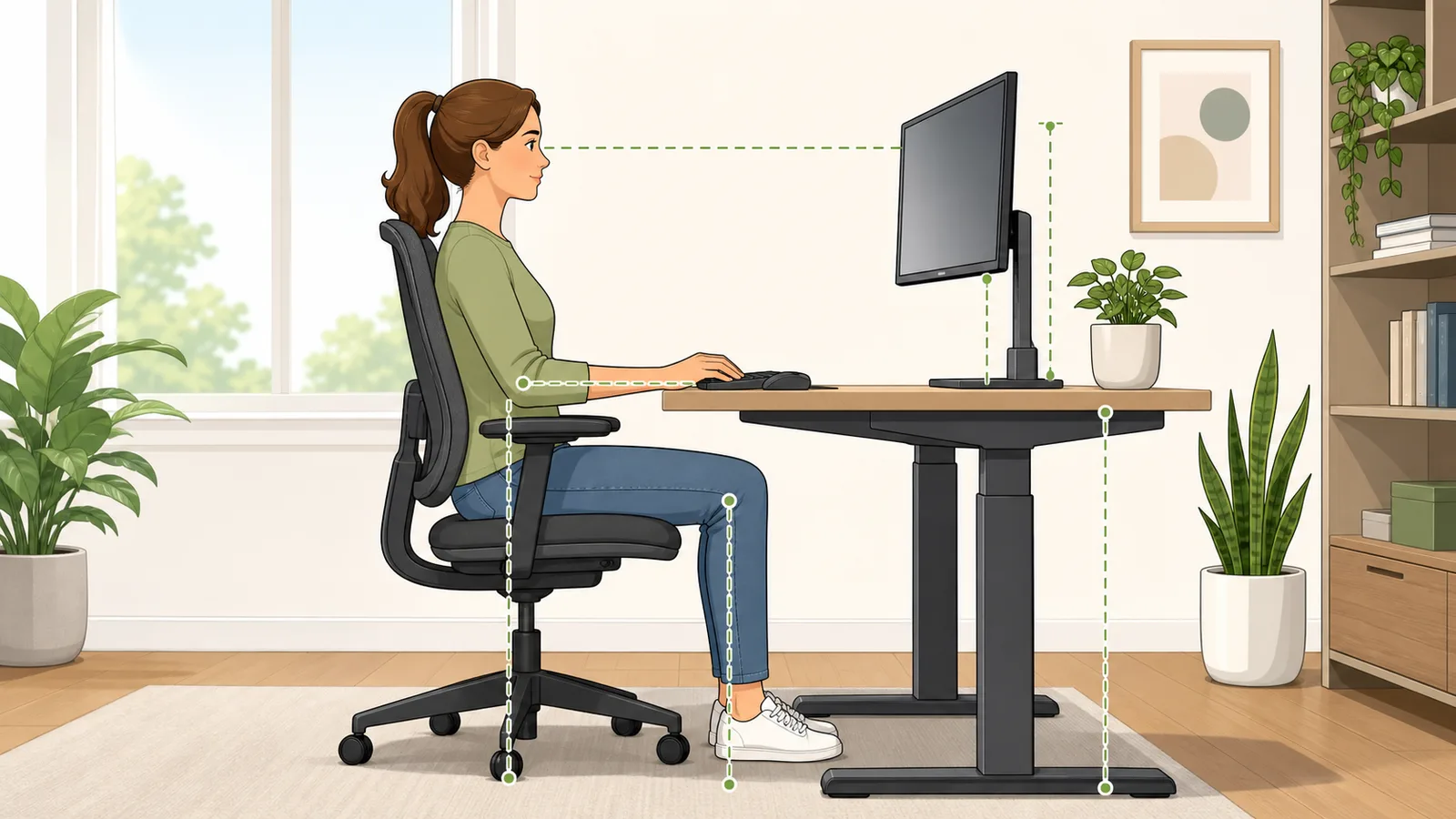
Most people search for a desk height calculator because something in the workstation feels off: shoulders creep upward while typing, wrists bend back on the keyboard, the monitor feels too low, or a fixed desk seems impossible to make comfortable. Those issues are connected. Desk height, chair height, keyboard height, and monitor position should be treated as one ergonomic system rather than as separate guesses.
That is why this calculator gives you more than a single ergonomic desk height. It estimates a seated desk target, a standing desk target, a chair seat starting point, a keyboard surface height, monitor-top and monitor-center heights, and a fit check for a fixed desk. In practice, that turns the page into a workstation planner rather than a static desk chart.
Why one standard desk height fails many users
Traditional office desks often land around 73 to 76 cm, which works reasonably well for some adults but not for everyone. Shorter users often have to raise the chair to reach the desk, which then leaves the feet unsupported. Taller users may find that the same desk forces a low keyboard position, rounded shoulders, or awkward monitor compromises. That is why the idea of one universal ergonomic desk height is misleading.
The right number depends on body size, posture style, input task, and whether the workstation is fixed, seated, standing, or sit-stand. A writing desk can also tolerate a slightly higher surface than a typing workstation because the forearms and wrists interact with the surface differently.
How this ergonomic desk height calculator works
The calculator starts with body height and uses ergonomic workstation ratios to estimate the work-surface height that keeps elbows close to desk level with relaxed shoulders. If you know your seated elbow height from the floor, you can enter it for a more precise result. That measured value is often the best way to fine-tune desk height because it reflects your own proportions rather than a population average.
The tool then adjusts the result for typing-heavy work, reading, or writing, because those tasks do not all use the same keyboard or desk relationship. It also estimates chair height, keyboard surface height, and monitor placement so you can see how one change affects the rest of the setup.
Estimated seated desk height ≈ standing height × 0.42, then adjusted for task and posture
This is the body-height fallback used when a measured seated elbow height is not available.
Estimated standing desk height ≈ standing height × 0.62, then adjusted for task and footwear or mat thickness
Standing elbow height is the key anchor for a standing desk preset.
Chair seat height ≈ standing height × 0.25
This provides a practical starting point for feet supported, thighs level, and hips slightly above the knees.
Using centimetres, feet, and inches without changing the ergonomic logic
Search results for desk height by height often mix metric charts with inch-based standing desk height calculators. The unit switch in the calculator is there so you can enter the measurements you actually know: centimetres for metric furniture specs, or feet and inches when body height and desk height are easier to measure that way.
Changing units does not change the ergonomic method. The calculator converts the active inputs into a consistent centimetre basis internally, applies the same seated elbow-height, standing elbow-height, keyboard-height, chair-height, and monitor-height relationships, and then displays the result with the active unit first. That makes the page more useful for both metric-first users and people comparing inch-based desk or chair specifications.
Ergonomic chair height, keyboard height, and monitor height work together
A chair that is too low makes even a correctly sized desk feel high because the elbows sit below the keyboard. A chair that is too high may restore elbow position but create hanging feet and pressure under the thighs unless you add a footrest. That is why the calculator shows chair height and not only desk height.
Keyboard height often needs to sit slightly below the main desk surface for sustained typing, especially on thicker desks or when a tall mechanical keyboard is used. Monitor height also changes after chair adjustments. Raise the chair and the monitor may suddenly be too low; lower the chair and the monitor may start feeling too high. Ergonomic desk setup is mostly about keeping those pieces coordinated.
Standing desk height is not just the seated desk plus a guess
A standing desk height calculator should not simply add an arbitrary number to the seated desk setting. The standing preset needs to place the keyboard near standing elbow height while keeping the screen high enough that you are not flexing the neck downward all day. That is why the calculator shows a separate standing desk height and standing monitor target.
If you use a sit-stand desk, the practical question is often the gap between the seated preset and the standing preset. Saving both positions as memory buttons is usually more reliable than trying to remember a range each time you change posture.
What to do if your fixed desk is too high
A fixed desk that sits above your seated target is one of the most common ergonomic problems because it encourages shrugged shoulders and wrist extension during typing. The first compensation is usually to raise the chair until elbows line up better with the desk. If that leaves the feet unsupported, a footrest becomes part of the ergonomic fix rather than an optional accessory.
If the fixed desk is substantially too high, chair adjustment alone may not be enough. A keyboard tray, thinner keyboard setup, or eventually a more adjustable workstation may be the cleaner solution. This is where a desk height calculator is most useful: not just telling you the ideal number, but showing what recovery strategy makes sense when the desk cannot move.
What to do if your fixed desk is too low
A low desk usually creates a different pattern: rounded shoulders, trunk flexion, and a tendency to collapse downward toward the work surface. Lowering the chair sometimes helps if the mismatch is small and your feet still stay planted. When the gap is larger, desk risers, a desk converter, or a different surface is usually more ergonomic than forcing the chair lower and lower.
A desk that is already too low for seated work is even less likely to suit a standing setup. That is why this page compares the fixed desk against the seated target first and then shows the separate standing target as a decision point for whether a sit-stand converter or adjustable desk is justified.
Monitor height, monitor distance, and bifocals or progressives
General monitor guidance places the top of the screen at or slightly below eye level, with the center of the screen lower and the display roughly at arm's length. The Occupational Safety and Health Administration notes that the center of the monitor normally sits about 15 to 20 degrees below horizontal eye level, which is why the tool reports both top-of-screen and center-of-screen positioning.
Users wearing bifocals or progressive lenses often need the monitor a little lower and slightly closer than standard guidance suggests. Otherwise the head tips upward to find the reading zone, and that can turn a good desk height into a painful neck setup. The calculator includes a specific vision option for that reason.
Worked example: 175 cm user planning a sit-stand desk
Suppose you are 175 cm tall, primarily type at the computer, use a 24-inch monitor, and want a sit-stand setup. In this calculator, the seated desk target lands at 72 cm and the standing desk target at 107.5 cm. Chair height starts near 43.8 cm, and the keyboard surface target lands slightly lower than the main desk surface at 70.5 cm.
If your current fixed desk is 80 cm tall, the tool shows that the desk is about 8 cm too high for relaxed seated typing. That is a meaningful mismatch, not a tiny rounding issue. In practice, you would usually need to raise the chair, add a footrest, and consider a keyboard tray rather than trying to tolerate the desk as-is.
How to measure seated elbow height well
Seated elbow height is measured from the floor to the underside of the elbow while you are sitting in your actual working posture. Keep shoulders relaxed, upper arms close to the body, and elbows bent at roughly 90 degrees. That number is more useful than forearm length because it already includes the effect of chair height and your chosen seated posture.
If your work posture changes a lot across the day, use the posture you spend the most time in. For example, a very upright drawing posture and a slightly reclined typing posture may justify different work-surface heights, which is one reason adjustable desks and keyboard trays can outperform fixed furniture.
Why movement still matters after you set desk height
Even a very good ergonomic desk height does not remove the need to move. Static loading is one of the main problems of computer work, whether you are sitting or standing. A sit-stand desk helps because it lets you change posture, but standing still for hours is not automatically healthier than sitting all day.
Use the desk numbers as anchors, then change posture regularly. A simple rule is to reset posture every 30 to 45 minutes, use shorter standing bouts to start, and add brief walking or shoulder-roll breaks each hour. That pattern is usually more sustainable than trying to stand for long uninterrupted blocks.
Frequently asked questions
What is a good desk height for typing?
A good typing desk height is the one that lets your elbows sit near desk level with relaxed shoulders and straight wrists. For many adults that lands somewhere around the low-70-centimetre range, but body size and chair setup matter enough that a personal desk height calculator is more useful than a generic chart.
What is a good standing desk height?
A good standing desk height places the keyboard around standing elbow height so the shoulders do not rise and the wrists do not bend upward. For many adults this lands somewhere around 100 to 115 cm, but the correct number depends on height, task, and footwear or anti-fatigue mat thickness.
Should my keyboard be lower than my desk?
Often yes. For sustained typing, the keyboard surface is commonly a little lower than the main desk top so the wrists can stay straighter. That is why keyboard trays can help when a fixed desk is otherwise too high.
What if my desk is too high even with the chair raised?
If raising the chair improves elbow position but leaves the feet unsupported, add a footrest. If the desk is still too high for neutral wrists, a keyboard tray, thinner keyboard, or a different desk is usually a better solution than forcing the shoulders upward all day.
What if my desk is too low?
A slightly low desk may be manageable by lowering the chair if your feet still stay planted and the hips and knees remain comfortable. Larger mismatches usually call for desk risers, a desk converter, or a different work surface rather than chair-only compensation.
How far away should my monitor be?
A practical monitor distance is usually around arm's length. On this page the calculator gives a range rather than one rigid number, because a larger monitor can usually sit farther away than a smaller screen as long as text remains readable and you are not leaning forward to see it.
Where should the top of the monitor be?
A common ergonomic target is the top of the monitor at or slightly below eye level, with the center of the display lower than that. Users with bifocals or progressive lenses often need the monitor lower and slightly closer to avoid tipping the chin upward.
Do I need my seated elbow height to use the calculator?
No. Height alone is enough for a solid starting estimate. But seated elbow height usually gives a more personalized result because it reflects your real proportions and chair setup instead of relying only on average body ratios.
Can I use feet and inches instead of centimetres?
Yes. Switch the calculator to feet and inches before entering your body height, current desk height, seated elbow height, or shoe and mat thickness. The tool still applies the same ergonomic desk height method, but it shows inch-first results so you can compare them with inch-based desk, chair, and standing desk specifications.
Can one fixed desk work for both sitting and standing?
Not well for most people. A fixed desk can sometimes suit your seated height, but a proper standing desk height is normally much higher. If you want both positions, a sit-stand desk or desk converter is usually the more realistic solution.
Is a sit-stand desk automatically ergonomic?
No. An adjustable desk can still be set badly. You still need the seated preset, standing preset, chair height, keyboard position, and monitor height to move together. The value of a sit-stand desk is the ability to change posture, not the guarantee of good posture.